

SyncoPirate
Stutter with soul.
SyncoPirate is a real-time syncopation audio plugin that transforms rhythmic material into new grooves. Work with live audio input or load WAV, AIFF and FLAC files.
SyncoPirate finds the attacks in your audio and moves them to new positions on a rhythmic grid. Pull a few hits off the beat, turn a straight break into a lopsided groove, or break a phrase into a stutter with some soul. The sounds come from the material you feed it, so a drum break, a bass riff, and a chopped vocal each give you something different to work with.
Coming soon
Planned price: $29 USD
Purchase and download options will be published when the product becomes available.
Work with a track or a sample.
Live input.
Put SyncoPirate on an audio track and let it capture complete phrases as your session plays. Choose phrase lengths from half a bar to eight bars. Host mode follows the DAW transport.
File input.
Load a WAV, AIFF, or FLAC file, preview it in the waveform view, and select up to 32 seconds to loop. The selected source region keeps its original speed and pitch.
Freeze and recapture.
Hold a captured phrase while you reshape its groove. Use Capture Next Bar to queue a new capture at the next eligible boundary. A completed Freeze capture or imported region can be saved with your DAW project.
Shape the groove by ear and by eye.
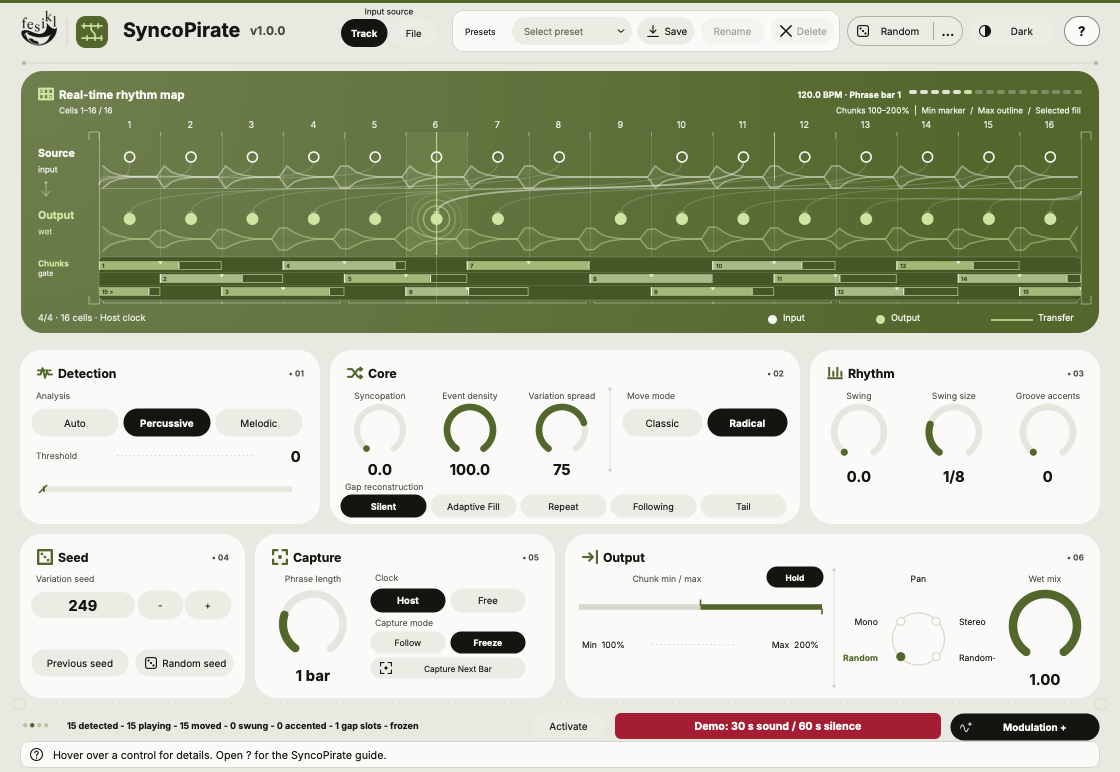
The rhythm map shows where the original attacks landed and where SyncoPirate moved them. Use Syncopation, Event Density, and Variation Spread to decide how much of the phrase moves and how far. Choose Classic for more restrained shifts or Radical for deeper rhythmic displacement. Add swing and groove accents, then set Wet Mix to bring the original phrase back into the blend.
Set a range of fragment lengths for individual attacks. Shorten hits to leave space or let longer fragments overlap into a texture. For the gaps between hits, choose silence, adaptive fill, a repeat of the previous attack, a preview of the next attack, or a fading tail. When you find a variation you like, the same seed, source audio, and settings let you recreate it.
Make the pattern evolve.
Six assignable modulation lanes can move rhythm, fragment length, mix, and stereo width. Build motion with an LFO, follow the input or detected attacks with envelopes, distribute accents with a Euclidean Gate, or introduce changes with Triggered Random. Use relative modulation around a control’s current setting or map a source between two chosen endpoints.
Three ways to start.
Rephrase a drum loop.
Start with a one-bar phrase in Classic mode, then turn up Syncopation and bring the source back with Wet Mix.
Make a bass line answer itself.
Use Melodic analysis and leave some gaps silent so the displaced notes have space to land.
Turn percussion into a texture.
Freeze a phrase, allow longer chunks to overlap, and modulate the wet stereo width slowly.
Audio & video demonstrations
Demonstrations will be added here.
System requirements and licence
- Type
- Audio effect
- Format
- AU / VST3
- Platform
- macOS (Apple Silicon)
- Requirements
- Apple Silicon Mac, macOS 26.0 or later, and a DAW that hosts AU or VST3 audio effects.
A personal licence covers up to three compatible Macs. Activate with your Gumroad licence key and a one-time code sent to the purchase email. Internet access is required for activation and renewal. Each successful validation grants up to 72 hours of offline use.